




Read time: 10 minutes
Part 1 of 2 explains why just-in-time privileged access is more secure and easier to use than traditional PAM. This article focuses on security, while Part 2 covers deployment and day-to-day use.
Just-in-time (JIT) privileged access gives a verified user or process administrative rights only when they are needed for a specific task, then removes them when the task ends. The goal is zero standing privilege: no account holds admin rights until a task requires them. Most organizations have far more standing privilege than they realize. JIT can reduce the time an account holds usable privilege from every hour of the week to only the hours required for approved work.
What you’ll learn
- What privilege sprawl is and why most organizations cannot measure it
- Why traditional, vault-based PAM leaves standing privilege in place
- How attackers, including AI-driven attackers, use standing privilege
- How just-in-time access reduces the time a stolen credential is useful, and where to start removing standing privilege
What is privilege sprawl?
Privilege sprawl develops when administrative rights grow beyond what users and systems need. Access is often granted to complete a task but rarely removed afterward. Every unused right remains available to anyone who compromises the account that holds it.
In most organizations, privilege accumulates through a familiar cycle. An administrator, service, or vendor needs access for a task, and the fastest way to grant it is to add the account to an existing privileged group or role. When the task finishes, or the account changes owner, role, or purpose, no process removes the membership, and the next request repeats the cycle. This privilege creep is how standing privilege builds up, and it is the problem JIT solves.
Over time, privileged access becomes scattered across many places:
- Human accounts: directory group memberships (including nested groups), local administrator accounts, cloud roles in Entra ID, AWS, Azure, and Google Cloud, SaaS administrator roles, and vendor, contractor, and former-employee accounts
- Non-human identities: service accounts with passwords that have not changed in years, OAuth applications and service principals with broad API permissions, and API keys and tokens held by scripts, pipelines, and AI agents
- OT devices: shared local accounts on PLCs, HMIs, and engineering workstations
Research illustrates the scale of the problem. Oso and Cyera analyzed 3.6 billion application permissions across 2.4 million workers and found that 96% of granted permissions went unused during a 90-day period. Palo Alto Networks’ 2026 Identity Security Landscape report found an average of 109 machine identities for every human identity, while only 39% of privileged access is managed.
Why can’t most organizations see their privileged attack surface?
Privileged access is distributed across directories, cloud platforms, applications, and devices, each with its own records. Effective privilege often comes from nested groups, inherited roles, and application permissions that do not appear in a list of administrator accounts. Most inventories count accounts rather than showing what those accounts can actually do.
Several factors make this difficult to measure:
- You must calculate effective rights rather than simply look them up. A user may belong to a group that belongs to another group with an admin role, yet never appear in the role’s direct membership.
- Every system has its own console and reporting format. Active Directory, Entra ID, AWS IAM, Salesforce, and an OT historian all represent privilege differently, and few teams consolidate those records.
- Non-human identities rarely receive the same level of review as people. A departing employee triggers an access review, but a service account, OAuth application, or API key usually does not.
- Access reviews typically confirm whether access is approved, not whether it is actually used. A right approved three years ago but never exercised can still pass most reviews.
- PAM tools can vault, rotate, and monitor only the accounts that have been discovered and onboarded.
Why doesn’t traditional PAM remove the risk?
Traditional PAM stores privileged passwords in a vault, rotates them, and records sessions. This controls how a privileged account is used, but the account and its rights remain in place between uses. An attacker who steals a hash, Kerberos ticket, or token can use those rights without obtaining the vaulted password. A vaulted domain admin account is still a domain admin account 24 hours a day. Techniques such as pass-the-hash, pass-the-ticket, Kerberoasting, DCSync, and token theft target the account’s rights directly.
Early in my career, I built and sold vault-based PAM. By 2019, I concluded that vaulting a privileged account didn’t remove the risk created by its continued existence. I began looking at a different model: create or elevate privilege when a task starts, then remove it when the task ends. Gartner now calls this zero standing privilege (ZSP), which is the foundation of just-in-time privileged access management (JIT PAM).
There’s a New Name in PAM.
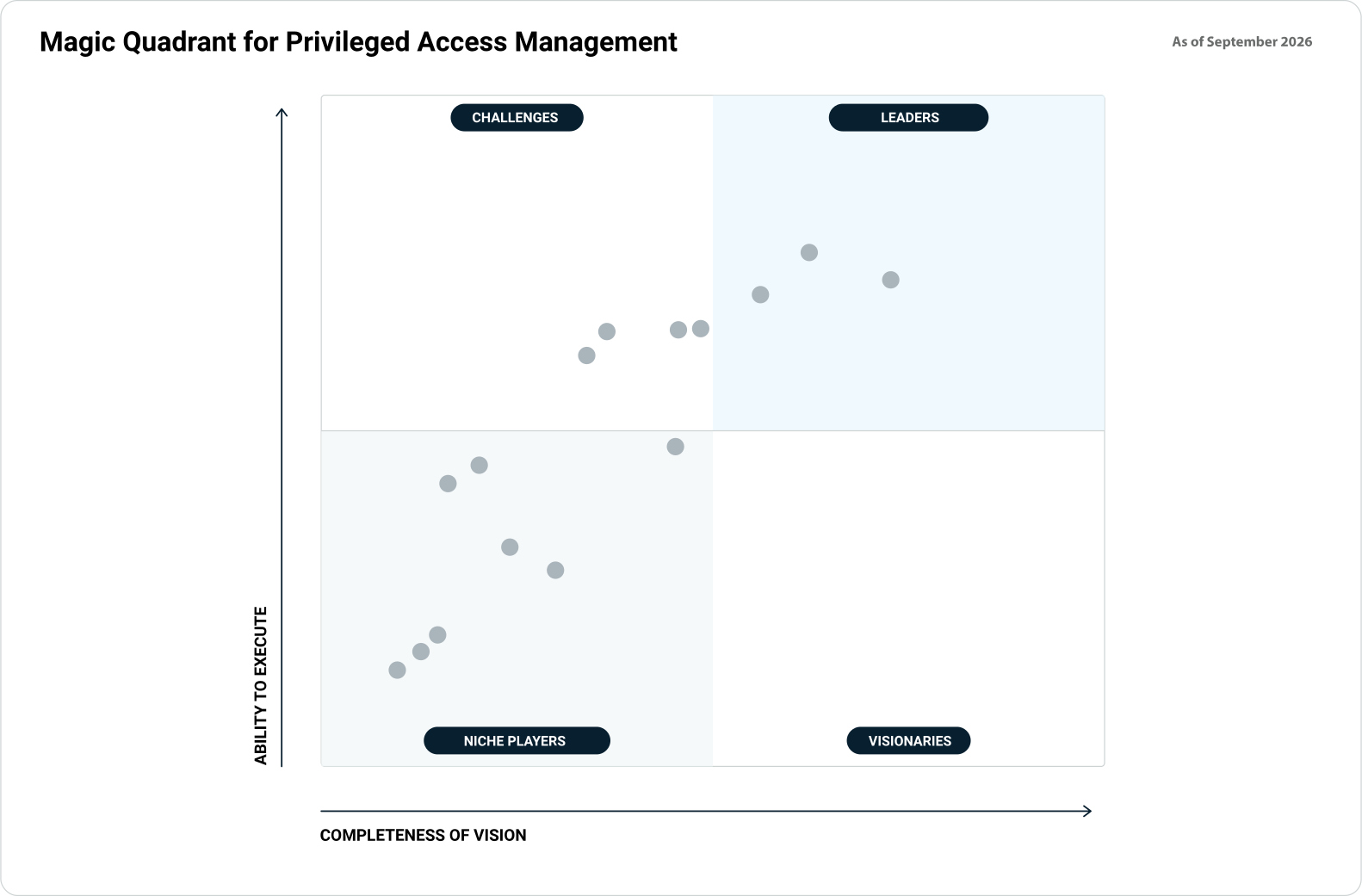
Xage Security Named in the 2026 Gartner® Magic Quadrant™ for Privileged Access Management
How do attackers use standing privilege?
Attackers look for accounts that already have privilege and use those rights to move between systems. They do not need sophisticated new techniques when standing privilege and basic gaps, such as missing MFA or shared local admin passwords, are available. AI-driven tools can now run these searches faster and across more targets.
Recent incident data shows how often attackers rely on valid accounts. CrowdStrike’s 2026 Global Threat Report found that 82% of detections were malware-free, valid account abuse accounted for 35% of cloud incidents, and the average eCrime breakout time was 29 minutes, with the fastest at 27 seconds. Rapid7’s 2026 Global Threat Landscape Report found that valid accounts without strong MFA drove 43.9% of its incident response investigations, and Mandiant incident responders have estimated that about 90% of the attacks they investigate involve Active Directory.
Example: Active Directory to Entra ID
Most organizations synchronize on-premises Active Directory with Microsoft Entra ID so each user has one identity. Microsoft Entra Connect Sync creates a service account in each directory. According to Microsoft, the on-premises account can replicate directory changes and modify passwords, users, and groups. If an attacker compromises the sync account, they may be able to set or change the Entra ID password of any synchronized account. Microsoft 365, Azure, and every SaaS application that uses Entra ID for sign-in accept the identities Entra ID asserts.
Microsoft Threat Intelligence documented how a ransomware affiliate, Storm-0501, used this connection in five steps:
- Gained initial access through unpatched internet-facing servers or credentials bought from access brokers.
- Collected credentials across many devices with Impacket’s SecretsDump until it held multiple Domain Admin credentials.
- Located the Entra Connect Sync servers and extracted the plain-text credentials of both sync accounts.
- Moved to Entra ID. In some cases, a compromised Domain Admin had a matching cloud account with MFA disabled and the Global Administrator role.
- Created a federated domain in the tenant that allowed it to sign in as any user, then deployed ransomware through Group Policy.
Every step relied on an account that already held privilege before the attacker arrived.
Example: a trusted application with standing permissions
On October 21, 2026, Microsoft reported that a China-aligned actor, Storm-0940, used an agentic AI penetration-testing framework called ARTEX against hundreds of organizations. After compromising a vendor’s multi-tenant cloud application, the actor’s AI agents used the application’s existing permissions to sign in to customer tenants. In at least one tenant, the application assigned itself the Global Administrator role. In several cases, fewer than three hours passed between initial targeting and privileged cloud access.
The application’s permissions were granted when the integration was set up and remained in place. The attacker used them without signing in as a person.
What AI changes
The techniques used in both examples are documented and well understood. What AI changes is the speed and number of targets. An automated agent can check every target for the same conditions and pursue several paths at once, looking for privileged accounts without MFA, crackable service accounts, servers that store privileged credentials, over-permissioned applications, and dormant accounts.
Each of these is a basic control that organizations often leave unaddressed. At that speed, detection alone may not give defenders enough time to respond. A more reliable approach is to remove the privilege before the attacker reaches the account.
How does just-in-time access reduce the time attackers have?
Just-in-time privilege replaces permanent admin rights with access granted for a specific task and removed automatically afterward. An account that holds privilege for 6 hours a week instead of 168 gives a stolen credential, hash, or token 96% fewer hours to use for privileged actions.
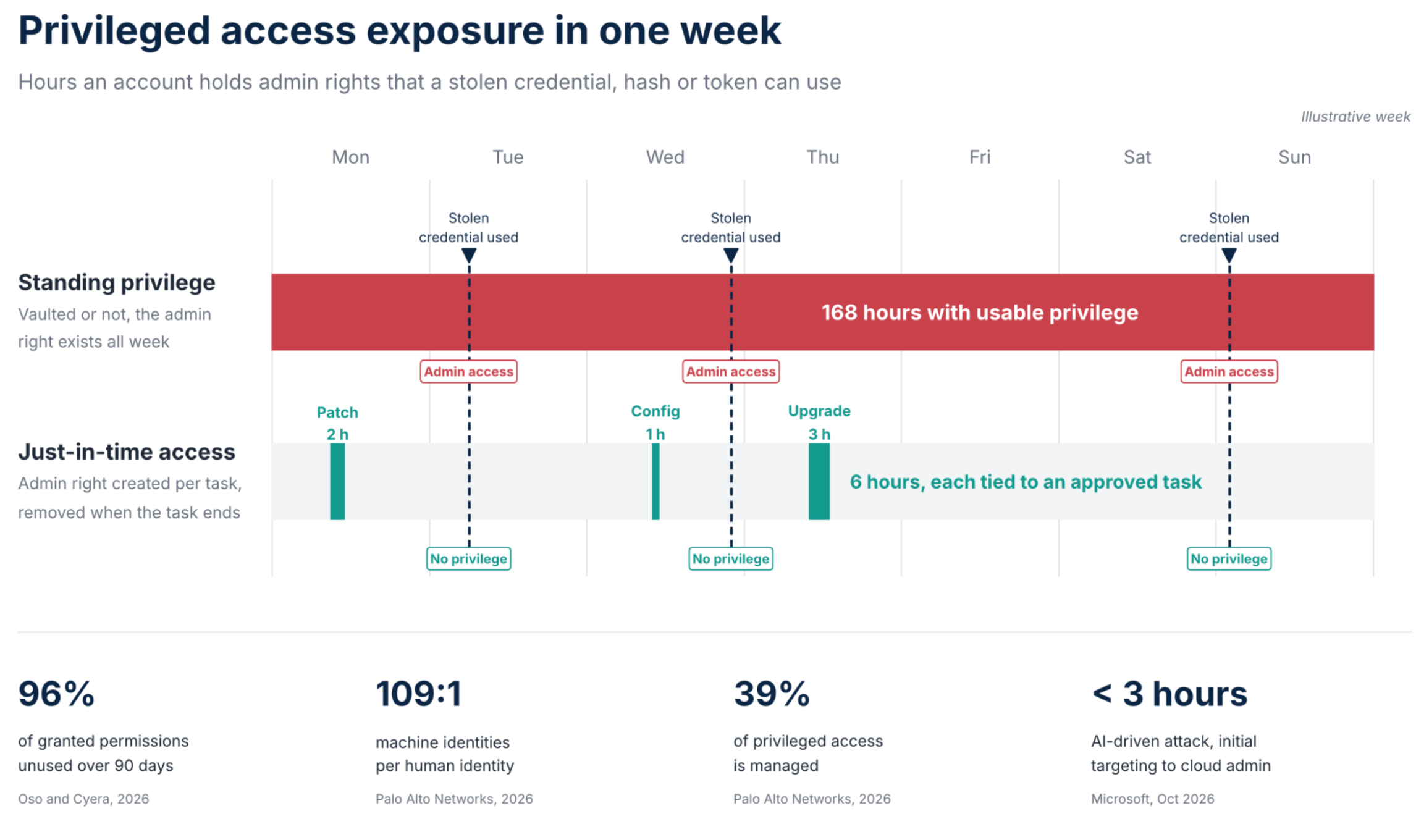
One week of admin rights: 168 hours with standing privilege versus 6 hours across three approved JIT tasks.
A typical JIT workflow has seven steps:
- Request: a user or process asks for access to a specific resource for a specific task, often tied to a change ticket.
- Verify: confirm identity with phishing-resistant MFA and check context, such as device, location, and time.
- Approve: a policy or a named approver authorizes the scope and the duration.
- Grant: the privilege is created at the time of use, through an ephemeral account, a time-limited group or role membership, or a brokered session that injects a credential the user never sees.
- Monitor: the session is recorded and can be terminated if activity falls outside the approved task.
- Revoke: the privilege is removed when the task or time limit ends, the credential is rotated, and any ephemeral account is disabled or deleted.
- Audit: log the request, approval, session, and revocation against a named person.
The table below outlines what common attack techniques require and how removing standing privilege changes their effectiveness.
| Technique | What the attacker needs | Effect of JIT and zero standing privilege |
| Pass-the-hash or pass-the-ticket | A hash or Kerberos ticket from an account that holds privilege | Hashes and tickets collected between tasks belong to accounts with no admin rights. Ephemeral credentials expire with the session. |
| Password spraying and credential stuffing | A guessable or reused password on an account that already holds privilege | A guessed password opens an account with no admin rights. |
| Kerberoasting | A service account with a crackable password and privileged rights | Once privileged group membership is removed, a cracked password grants only the service’s rights. |
| Cloud role abuse | A user or application permanently assigned an admin role | Admin roles are activated per task and expire. No account holds Global Administrator or equivalent by default. |
| Dormant and vendor accounts | An old account that kept its rights | Access expires when the task ends, so there is no unused privileged account to find. |
| Session hijacking during a task | Access to an active privileged session | The session is monitored, limited to the approved scope, and can be terminated. Privilege ends with the session. |
JIT does not apply to every identity. Some accounts need rights continuously, such as directory sync accounts and some service accounts. For these, the controls are different: restrict where the account can sign in from, limit its rights to what the service uses, store its credentials on a hardened Tier 0 server, and alert on any use outside its normal pattern. JIT then removes standing privilege from the human admin accounts that attackers compromise to reach those servers.
For more detail on related controls, see just-in-time access and session termination and privileged session management requirements.
Where should you start?
Begin by measuring effective privilege across every system, then remove standing human privilege from the systems that control identity. Next, apply the same controls to cloud roles, vendors, service accounts, and endpoints. Each step reduces the number of accounts and the amount of time an attacker can use them.
- Discover effective privilege. Collect privileged accounts and roles from directories, cloud platforms, SaaS applications, and OT systems, and resolve nested groups and inherited roles to show what each identity can do.
- Identify Tier 0 and remove unused rights. List the systems that can change identities or grant privilege: domain controllers, identity providers, sync servers, federation servers, certificate authorities, and the PAM system itself. Remove privileged memberships and permissions on these systems that have not been used within a defined period.
- Convert human admin access to JIT. Remove standing members from privileged groups and roles, and grant access per task with an expiry. In Active Directory, the Privileged Access Management optional feature supports time-limited group membership.
- Separate cloud administration. Assign privileged cloud roles to cloud-only accounts that are not synchronized from on-premises directories, require phishing-resistant MFA, and activate them per task.
- Apply JIT to vendors and contractors. Replace standing vendor accounts and VPN access with access requested per task, recorded, and removed automatically.
- Reduce non-human privilege. Scope application and API permissions to what each integration uses, use short-lived credentials where the platform supports them, and give AI agents their own identities instead of reusing human accounts.
- Harden what remains. Give every machine a unique, rotated local administrator password with a tool such as Windows LAPS, alert on new privileged memberships, role assignments, application credential changes, and federation changes, and keep cloud-only break-glass accounts with credentials stored offline.

How Xage applies just-in-time access
Xage Zero Trust PAM is built on zero standing privilege. It gives admins, contractors, and third parties identity-verified, time-limited sessions and automatically removes access when each session ends. Credentials are rotated at every login and injected into the session so users never see them. Xage enforces MFA at each network hop, and it can monitor, record, and terminate every privileged session.
XPAM protects assets from day one, even before every privileged account has been discovered and onboarded, because Xage policy governs access to each asset. These controls work across IT, OT, and cloud environments, including sites with intermittent connectivity. The policy is enforced locally, and credentials are stored in a distributed vault rather than a single central store.
Key takeaways
- Privilege sprawl develops because organizations grant rights for specific tasks but rarely remove them afterward. Research shows that 96% of granted permissions go unused over a 90-day period.
- Traditional PAM controls how privileged accounts are used, but it leaves those accounts and their rights in place between uses.
- Attackers, including those using AI-driven tools, first exploit standing privilege and basic security gaps. Active Directory and Entra ID provide one example; trusted applications with permanent permissions provide another.
- Just-in-time access reduces the time an account holds privilege from 168 hours a week to only the hours required for approved work. As a result, most stolen credentials grant access to accounts without admin rights.
Part 2 of this series addresses the other half of the argument: why administrators resist traditional PAM and how JIT access with automated approvals can be easier to use day to day.
See Xage just-in-time access in action.
Frequently asked questions
What is just-in-time privileged access?
Just-in-time privileged access gives a user or process administrative rights only when a specific task requires them. Access is granted for a limited period after identity verification and approval, then removed automatically when the task or time limit ends. This approach replaces permanent membership in privileged groups and roles.
What is zero standing privilege?
Zero standing privilege (ZSP), sometimes called zero standing access, means that no account holds administrative rights by default. Privilege exists only during an approved, time-limited session; just-in-time access achieves ZSP.
What is privilege sprawl?
Privilege sprawl is the accumulation of administrative rights beyond what users, services, and applications need. It happens when access granted for a task isn’t removed afterward and can affect directories, cloud roles, SaaS applications, service accounts, API keys, and vendor accounts.
How is JIT different from a password vault?
A password vault stores and rotates an account password that remains privileged at all times. Just-in-time access removes the privilege itself between tasks. Attacks that use hashes, tickets, or tokens can bypass the vaulted password, but they cannot use privilege that is not present.
Does MFA remove the need for just-in-time access?
No. MFA verifies who is signing in, while just-in-time access limits what the account can do and for how long. Attacks such as pass-the-hash and token theft use credentials after authentication, so MFA and JIT address different stages of an attack and work together.
Why does Active Directory security affect Entra ID?
Microsoft Entra Connect Sync copies identities and password data from Active Directory to Entra ID, and its service accounts can change passwords for synchronized accounts. An attacker who controls Active Directory or the sync server may be able to change cloud identities. As a result, an Active Directory compromise can spread to Microsoft 365, Azure, and applications that use Entra ID for sign-in.
How are attackers using AI against privileged accounts?
Attackers use AI agents to automate reconnaissance, password spraying, credential harvesting, and searches for high-privilege accounts and applications. In October 2026, Microsoft reported cases in which AI-driven attacks reached privileged cloud access in under three hours. The techniques are familiar; AI speeds them up and lets attackers pursue more targets at once.
About the author
Martin Cannard is Sr. Director of Marketing at Xage Security. He has over 30 years of experience in identity security and privileged access management, with product and strategy roles at Quest Software, BeyondTrust, Stealthbits, and Netwrix. Martin pioneered just-in-time PAM, and pushed the industry towards the approach commonly known as zero standing privilege. As a patent holder, and sought after speaker, Martin has spoken at Microsoft Ignite, RSAC, SANS, and Infosecurity Europe. www.linkedin.com/in/martincannard