




Read time: 10 minutes
This article applies privileged access management best practices to deployment. It explains how Just-in-Time (JIT) privileged access and ephemeral accounts can help make your PAM project more successful by reducing user friction and risk.
One of the most important PAM best practices for deployment is removing standing privilege from every privileged account, and measuring progress by how much standing privilege is gone, not by how many accounts are in a vault. Just-in-Time (JIT) privileged access gives a verified user or process the admin rights needed for a specific task, then removes those rights when the task is done. The goal is zero standing privilege, meaning no account has admin rights unless needed for a job. Many organizations have more standing privilege than they think. JIT reduces the time an account has admin rights from all week to only the hours needed for approved work.
Why do PAM implementations fail?
Most PAM rollouts fail not because the product is faulty, but because they don’t cover all privileged accounts. Deploying PAM changes how admins work, involves many teams and systems, and often takes so long that other priorities take over.

Owning identity security tools is not the same as covering every account. 85% of organizations have deployed identity threat detection tools, yet 55% still had an identity-related breach in the past 12 months, according to the SANS 2026 State of Identity Threats & Defenses Survey. The same survey found that only 8% rotate most of their non-human identity credentials every 90 days, which shows how many service accounts and API keys remain outside credential management.
Most rollouts run into four problems:
- Deploying PAM can be tough. The proof of concept (POC) usually runs in a clean environment with only a few use cases. Moving to production is much more challenging.
- Users often resist change. If admins find the new process slower, they may find ways to bypass it, and each workaround creates a security gap.
- Priorities can shift. New audit findings, incidents, and projects often come up before the rollout is finished, so expansion is often delayed.
- There are many dependencies. PAM affects directories, servers, databases, network devices, cloud platforms, the helpdesk, change management, and every team responsible for these areas.
After a successful POC, a traditional vault-based privileged access management implementation requires the team to:
- Find the privileged accounts on each system.
- Onboard each account into the vault and verify that password rotation doesn’t break the applications and services that use it.
- Define the roles and write the access policies.
- Assign users to those roles.
- Remove the existing privileges from the user accounts and groups.
- Change the processes that the admins use on a day-to-day basis, train them, and then repeat for the next system.
Each step needs input from people outside the security team, and step 2 fails if an app uses a hard-coded password. Most teams start with the easiest systems to onboard, or those that failed the last audit, and handle the rest later.
After years of scoping and deploying vault-based PAM, I found that projects rarely failed during the proof of concept. Problems started later, when it was time to build policies, define roles, and remove privileges from people who had them for years while the business kept running. Many projects stopped after the first group of servers because other urgent tasks came up, leaving most privileged accounts outside of PAM.
Why does a partial PAM deployment leave you exposed?
An attacker does not need to break your PAM system if there are privileged accounts outside of it. Any account not yet included in the rollout is still a privileged account, and attackers will target those. Your protection only extends as far as your coverage.
Breaches involving the abuse of valid accounts cost an average of $5.07 million and took 243 days to identify and contain, according to IBM’s 2026 Cost of a Data Breach Report. Accounts that are typically left outside of a partial deployment are:
- Local administrator accounts that share one password across many machines
- Privileged cloud roles assigned directly to everyday user accounts
- Service accounts left out because rotating their passwords might break an application
- Vendor and contractor accounts created for a project and never removed
- Accounts created by administrators to work around the PAM process
Third parties were involved in 48% of breaches in Verizon’s 2026 Data Breach Investigations Report, and only 23% of third parties fully fixed missing or improperly secured MFA on cloud accounts.
Example: standing cloud roles used after help desk impersonation
On 18th May 2026, Microsoft Threat Intelligence described how a threat actor they track (Storm-2949) used a small number of compromised user accounts to breach the entire cloud. The actor posed as IT support during self-service password resets, got IT staff and senior managers to approve MFA prompts, and registered its own authenticator on their accounts. Those users already held privileged custom Azure role assignments on several subscriptions, including the Owner role on a Key Vault. The attacker used them to read dozens of secrets in four minutes, then used those secrets to reach production web applications, SQL databases, and storage accounts, and exfiltrated data over several days.
The attacker did not defeat any privileged access control. It used role assignments that were in place before it arrived. Under JIT, those users would have held no Azure roles when the attacker took over their accounts, so the stolen accounts could not have opened the Key Vault or the production subscriptions. Microsoft’s recommendations include applying least privilege, auditing privileged accounts and role assignments, and requiring phishing-resistant MFA for administrators.
What AI changes
AI agents let attackers search for uncovered accounts faster and across more organizations. Google Threat Intelligence Group’s Q3 2026 AI Threat Tracker describes an actor that used an AI coding assistant and agent instructions to run a mass credential-harvesting operation in less than six hours. In a separate case, GTIG found an exposed command-and-control server holding more than 23,800 harvested secrets.In October 2026, Microsoft reported cases in which an agentic AI framework went from initial targeting to privileged cloud access in less than three hours.
More than 97% of identity attacks are password spray or brute force attacks, and MFA blocks more than 99% of unauthorized access attempts, according to Microsoft’s 2025 Digital Defense Report. These tools look for basic issues, such as accounts without MFA, shared local administrator passwords, unpatched internet-facing servers, and standing admin rights. Accounts not yet included in the PAM rollout often have several of these problems.
There’s a New Name in PAM.
Xage Security Named in the 2026 Gartner® Magic Quadrant™ for Privileged Access Management
How do end users make or break a PAM project?
Administrators determine if a PAM rollout succeeds because they use it daily. If the new process slows their routine work, they may find ways to bypass it, and each workaround creates privileged access outside the PAM system. Their buy-in is as important as the technical design.
People are involved in most breaches: the human element was present in 62% of breaches in Verizon’s 2026 DBIR. The same report shows how readily users go around sanctioned tools: 67% of users access AI services with non-corporate accounts on corporate devices.
Take a database administrator (DBA) who manages SQL Server using SQL Server Management Studio (SSMS) or Toad. The new process requires them to check out a password and connect through an RDP session to a jump server each time. This session has lower screen resolution and blocks file transfers to the DBA’s workstation. The DBA might ask for an exception, keep a local copy of the password, or create a second SQL login with sysadmin rights for emergencies. Each of these actions creates privileged access outside the PAM system. Other common workarounds include storing credentials in personal password managers or chat apps, sharing admin accounts, and keeping always-on access just in case.
To bring administrators into the project:
- Map how each administrator group works before you write policy: tools, connection methods, task frequency, and file transfer needs.
- Let administrators keep their own tools, such as SSMS or an SSH client, where the PAM system supports it.
- Approve routine, low-risk tasks automatically by policy, and require a named approver for high-risk systems.
- Measure how long it takes to get access before and after the change, and share the results.
Pilot users who find the new process works become the people who explain it to their colleagues.
How do just-in-time access and ephemeral accounts reduce rollout risk?
JIT access allows you to set up the new PAM model next to your current process, rather than switching everything at once. Since privileges are given only when a task starts and taken away when it ends, you don’t have to take over existing accounts before granting access. You can move users, departments, or systems in groups and turn off the old process for each group once the new one is working.
A cutover makes administrators change methods all at once while business continues. People often resist this, the new process can introduce new risks, and if it fails, the only option may be to give broad access again. A parallel JIT deployment avoids these problems with six steps:
- Leave the existing access process, and any existing PAM vault, in place.
- Deploy JIT access for one pilot group and the systems it manages.
- When a user requests access, the PAM system creates or enables the identity and the privilege needed for that task.
- When the task ends, the system removes the privilege and deletes or disables the account.
- When the pilot group can complete its work through JIT, turn off the old access method for that group and remove its standing privilege.
- Repeat by user, department, or system until the old process has no remaining users.
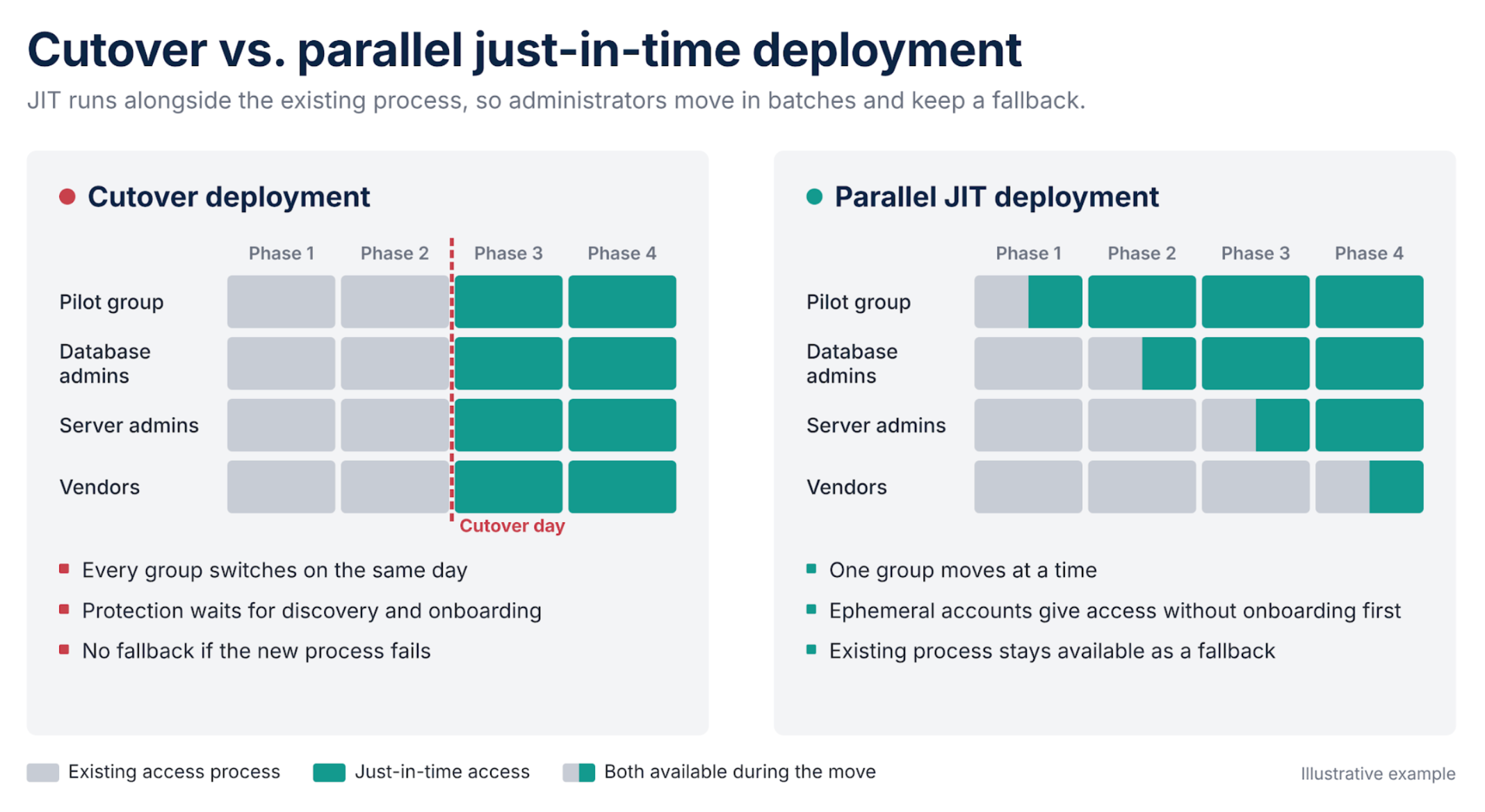
JIT can create the access it needs in two ways.
Identity orchestration with ephemeral accounts. The PAM system creates a one-time account for the session, such as jsmith4hs9k3h86fd, with just enough privilege for the task, and removes it when the session ends. Before and after the session, the account does not exist, so there is no credential to steal. A new account does not affect existing managed accounts or the vault that manages them.
Privilege orchestration for existing accounts. Some systems require a named admin account, such as jsmith-adm. The account stays disabled with no privileges between sessions, is enabled with the task’s privileges when the session starts, and is disabled when it ends. Existing managed accounts can be onboarded into the new system and offboarded from the old PAM solution as each batch moves.
Traditional PAM manages privileges that already exist. JIT removes privilege when it is not in use, so the new system has less existing configuration to take over before it can protect access.
The table below compares common deployment risks under each approach.
| Deployment risk | Cutover to vault-based PAM | Parallel JIT deployment |
| Account discovery is incomplete | Accounts not yet onboarded stay unprotected, and protection waits for onboarding | Migrated users get access through ephemeral accounts, so their access does not wait for discovery |
| Password rotation breaks a service | The service fails during cutover | Ephemeral accounts do not change the passwords of existing accounts |
| Users resist the new process | Workarounds appear on cutover day | A pilot group tests first, and the old method stays available until each batch moves |
| The new process fails | No fallback, so broad access is often restored | The existing process remains in place as a fallback |
| Priorities shift mid-project | Partially onboarded systems keep standing privilege | Each completed batch has zero standing privilege, and remaining batches continue as before |
| Audit evidence during the transition | Records are split between tools | Records are split until each batch moves, but each JIT session records the request, approval, session, and removal against a named person |
Parallel deployment has limits. Two access processes run at once, so you need to audit both and set a date to turn off each part of the old one. Ephemeral accounts do not suit every system: some applications tie settings to a named account, and many OT devices and network appliances have fixed local accounts. Use privilege orchestration or credential checkout with rotation for these. Accounts that need continuous access, such as directory sync accounts, still need separate controls, including limited sign-in locations and alerts for unusual use, and break-glass accounts should remain stored offline and monitored.
For more on related controls, see why enterprise security is moving beyond legacy PAM and privileged session management requirements.
Where should you start with PAM best practices?
Start your PAM implementation by inventorying privileged access and recording which accounts your current PAM deployment covers. Then pick a pilot group whose work you know well, ideally one with an open audit finding or many uncovered accounts. Run JIT access next to your current process, and expand in groups, setting a turn-off date for each. Track your progress by how much privileged access has no standing privilege, not by how many accounts are in a vault.
How Xage applies just-in-time access to PAM deployment
Xage Zero Trust PAM is agentless and can be deployed in as little as one day. Because Xage enforces access at each asset, it protects assets before account discovery is complete, so the rollout does not wait for every privileged account to be onboarded. Admins, contractors, and third parties receive identity-verified, time-limited access with MFA enforced at each asset, and access is removed automatically when the session ends.
Xage doesn’t need to take over existing accounts before granting just-in-time access, so teams can run it alongside their current access process and move users and systems in batches. Account discovery imports privileged accounts automatically or on demand, credentials are rotated and injected so users never see them, and every privileged session can be monitored, recorded, and terminated across IT, OT, and cloud environments, including sites with intermittent connectivity.
Key takeaways
- PAM projects often fail because they don’t cover everything. Complexity, user resistance, changing priorities, and dependencies can stop progress after the first systems.
- Privileged accounts outside the deployment keep their standing privilege, and attackers using AI agents find them faster.
- Administrators choose whether to adopt the new process. If it slows them down, they may find workarounds that lead to unmanaged privileged access.
- JIT access with ephemeral accounts lets you deploy in parallel with the existing process, move users in batches, and keep a fallback.
The next post covers how to map administrator workflows and build privileged access policies around each role’s tasks and risk.
See Xage just-in-time access in action.
Frequently asked questions
What are PAM best practices for deployment?
Privileged access management best practices for deployment are to inventory every privileged account, map how administrators work before writing policy, start with a pilot group, and replace standing privilege with just-in-time access. Running the new process alongside the existing one lets you move users in batches and keep a fallback. Measure progress by the share of privileged access with no standing privilege.
Why do PAM deployments fail?
Most PAM deployments fail because they stop before covering every privileged account. Common causes are complexity, slow onboarding, user pushback, shifting priorities, and dependencies on many teams and systems. Accounts left outside the deployment keep their standing privileges.
What is an ephemeral account?
An ephemeral account is a one-time account created for a single privileged session with only the rights the task needs. It is removed when the session ends, so it does not exist before or after the task. Ephemeral accounts are one way to deliver just-in-time privileged access.
What is a parallel PAM deployment?
A parallel deployment runs a new PAM process alongside the existing one instead of replacing it in a single cutover. Users, departments, or systems move to the new process in batches, and you turn off the old process for each batch once the new one works. The existing process remains available as a fallback during the move.
Can just-in-time access run alongside an existing PAM vault?
Yes. JIT access that uses ephemeral accounts does not change the accounts or passwords the existing vault manages, so both can run at the same time. Existing managed accounts can be moved to the new system when each batch is ready.
Does just-in-time access work for systems that cannot create accounts on demand?
Yes, with a different method. For systems with fixed local accounts, such as many OT devices and network appliances, JIT enables an existing account with the required privileges for the session and disables it afterward, or checks out a credential that is rotated after use.

About the author
Martin Cannard is Sr. Director of Marketing at Xage Security. He has over 30 years of experience in identity security and privileged access management, with product and strategy roles at Quest Software, BeyondTrust, Stealthbits, and Netwrix. Martin pioneered just-in-time PAM, and pushed the industry towards the approach commonly known as zero standing privilege. As a patent holder, and sought after speaker, Martin has spoken at Microsoft Ignite, RSAC, SANS, and Infosecurity Europe. www.linkedin.com/in/martincannard